
What does Google's generative AI performance report actually measure?
Google's generative AI performance report is an impressions-only visibility subset for AI Overviews and AI Mode, not a count of clicks, traffic, or conversions. An impression means a link to your site was shown to a user in a generative AI feature, and that number already lives inside the classic Performance report's Web totals.
The generative AI performance report is a dedicated view inside Search Console's Performance section that isolates visibility data for Google's AI-generated search features from the rest of a site's organic numbers. Google's announcement of the report notes that this data was already folded into the regular Performance report, where it continues to be tracked as part of overall site visibility. The dedicated view simply pulls generative AI impressions into their own report, broken out by Pages, Countries, Dates, and Devices.
That distinction matters for anyone trying to use the report to justify a marketing decision. An impression means Google's systems displayed a link to your page inside an AI-generated answer. It says nothing about whether a user read the answer, scrolled past it, clicked through, or took any action afterward. Read the number as a visibility signal, not a performance outcome, and the rest of the report gets much easier to interpret correctly.
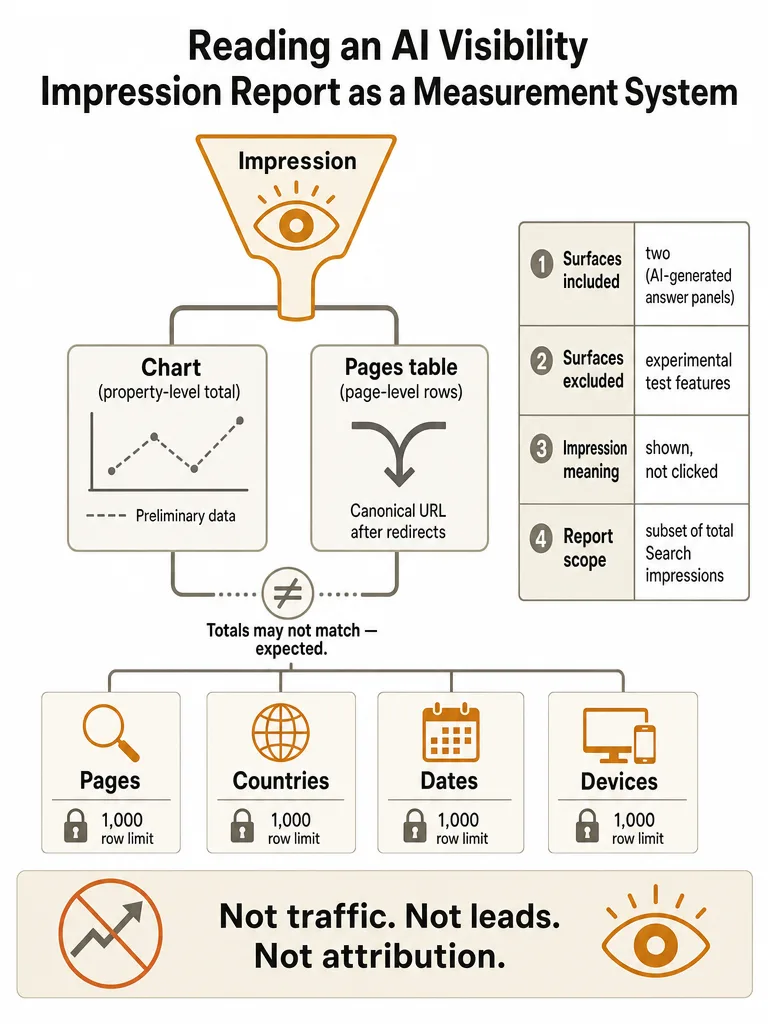
Which AI surfaces does the report cover, and which ones are excluded?
The Search version of Google's generative AI performance report covers two surfaces: AI Overviews and AI Mode. Google excludes Search Labs experiments from this report because those features are still in active development. A separate version of the report exists for Discover, but it measures a different surface entirely.
AI Overviews are the AI-generated summaries that can appear above or within a standard Google Search results page. AI Mode is Google's conversational search experience, a distinct interface with its own query flow. Both surfaces fall under the "Search" version of the report that this guide covers.
Search Labs experiments sit outside the report because Google still treats them as unreleased testing, not a production surface it reports on by URL. If a page shows up inside an experimental Labs feature today, that visibility won't register in the generative AI performance numbers until the feature ships beyond Labs.
The Discover version tracks a different context: generative AI features inside Google Discover, the feed surface on mobile. It uses the same impression definition but measures a separate product. Reading it correctly means treating it as its own report, not folding its totals into the Search version covered here.
When did this report launch, and is it available for every site yet?
Google announced the generative AI performance report on June 3, 2026, rolling it out initially to a subset of websites for testing. Full worldwide availability followed on August 31, 2026, when Google confirmed every site could access the reports. Hillel Maoz, Search Ecosystem Engineering Manager, and Moshe Samet, Product Manager Lead for Search Console, signed the announcement post on the Google Search Central blog.
Google's Search Central team framed the limited initial rollout as a chance to test the reports and collect feedback before expanding access, inviting feedback through the "Submit feedback" link in Search Console and a dedicated form. If you checked Search Console before August 31, 2026 and didn't see the report, that absence reflected the staged rollout rather than anything wrong with your property. Checking today, any site should have access, assuming it clears the minimum-impression bar covered later in this piece.
How to read the Pages, Countries, Dates, and Devices views
Google's generative AI performance report groups data four ways, as Google's Search Console help center documents: Pages, Countries, Dates, and Devices. Each view carries its own reading caveat, and missing one of them is the fastest way to misread the numbers. Google says all four views inherit the standard Search Console limitation of 1,000 rows per table.
| Dimension | What it groups by | Key caveat |
|---|---|---|
| Pages | Individual URLs that appeared in AI Overviews or AI Mode | Google assigns impressions to the final URL after redirects, and mostly to a page's canonical URL rather than a duplicate |
| Countries | The country associated with each impression | Good for spotting regional differences in AI feature rollout, but a zero-impression country isn't explained by the report itself |
| Dates | Impressions over hourly, daily, weekly, or monthly windows | Google says all timestamps use Pacific Time (PT), so volume spikes can look shifted against a team working in another time zone |
| Devices | Desktop, tablet, or mobile | Documented for the Search version of the report, available for Search results specifically |
Google says Pages data is assigned to the final URL after redirects, mostly to the canonical URL rather than a duplicate, which matters most for sites with parameterized URLs, AMP pages, or legacy redirects: those variants consolidate into one canonical row rather than splitting credit across duplicates. Combined with the 1,000-row cap Google documents for this report, a large site can lose visibility into long-tail pages that individually generate few impressions, even though their combined total is meaningful.
Why doesn't the chart total match the Pages table?
The chart and the Pages table in Google's generative AI performance report rarely add up to the same number, and that's expected behavior, not a bug. Google aggregates the chart by property, the whole site, while the Pages table aggregates by individual page. The newest points on the chart are also preliminary, shown as a dotted line, until Google finalizes that day's data.
Because the chart rolls everything up at the property level, while the Pages table sums impressions row by row across canonical URLs, the two totals can diverge even when nothing is wrong. Google says the newest hours or the most recent day in the chart can still shift because that data hasn't finished processing, and the dotted-line segment is the visual flag for "not settled yet."
Don't treat a short-term mismatch between the chart and the Pages table as an error to debug. Wait for the dotted-line segment to resolve into a solid line before comparing day-over-day totals, and use the chart to read trend direction rather than trying to reconcile it line-by-line against the Pages table.
How do you compare the generative AI report with the classic Performance report without double counting?
Comparing Google's generative AI performance report against the classic Performance report takes five steps, and skipping the filter-matching step is what usually causes double counting. The generative AI numbers aren't an addition to your classic Web impressions, they're already included inside them. Treat the generative AI report as a zoomed-in subset, not a second source of traffic.
- Pick one date range and apply it identically to both reports.
- Match the search type filter in both reports: Google lets you filter by search type, including "Web: text-based" and "Web: multimodal," and you need that filter set the same way on both sides before any comparison is valid.
- Pull generative AI impressions for the specific pages, countries, or dates you're investigating.
- Pull classic Performance report impressions, filtered to that same Web search type, for the exact same scope.
- Read the generative AI figure as a portion of the classic Web total already baked in, never as something to add on top of it.
Google's own announcement confirms this folding: generative AI impressions are "included in the overall performance report, where it will continue to be tracked," with the dedicated view added purely for visibility, not as a parallel metric. If you're building a recurring routine for this kind of comparison, the same discipline of fixing scope before drawing conclusions applies to measuring AI citations across engines without expensive tooling: match the time window and the page set first, then compare.
What this report can't tell you: clicks, leads, attribution, and causation
Google's generative AI performance report stops at impressions and never reaches clicks, leads, attribution, or causation. Google documents no way to isolate AI Overview or AI Mode clicks inside the classic Performance report, so there's no way to split "this click came from an AI Overview" from any other web click. Google also publishes no benchmark for what counts as a normal impression count for a given site or page type.
The report also has no Queries view. Google's documentation lists only four dimensions for this report, Pages, Countries, Dates, and Devices, with no breakdown of the search queries or prompts that triggered an appearance. A click would tell you someone followed the link, but Search Console's classic Performance report blends AI-sourced clicks into the same Web totals as every other search click, with no flag to separate them back out. A lead or a conversion sits another step further away, inside your own analytics or CRM, and nothing in Search Console connects a generative AI impression to what that visitor did next on your site.
Causation is the gap most teams fall into. A page showing more generative AI impressions this month than last doesn't mean the AI feature produced more business, only that Google displayed it more often. If you're working to improve how pages surface in AI Overviews, pair the impression trend with your own on-site conversion data rather than assuming one explains the other. With no published threshold for a "healthy" impression count by site size or industry, there's no official baseline to grade your numbers against, either.
Why don't I see the generative AI report for my site?
A missing generative AI performance report almost always means a site hasn't generated enough impressions in AI Overviews or AI Mode yet, not a broken setup or an access problem. Google states plainly that insufficient generative AI impressions is the usual reason the report doesn't appear, and Google gives no exact impression threshold for when the report turns on.
Worldwide rollout completed on August 31, 2026, so by now every property should have the report available in principle. If the view is still empty, the likely explanation is volume: the site's pages simply haven't appeared inside AI Overviews or AI Mode often enough for Google to have anything to show.
There's no published floor. Google hasn't stated a minimum impression count that triggers the report's appearance, and the report itself doesn't reveal where that cutoff sits. The practical move is rechecking the report periodically as a site's generative AI visibility grows, alongside the crawl and indexing checks already in place. For a broader check on whether a site is structurally ready to appear in AI answers at all, a tactical AI visibility audit covers the crawl and rendering checks worth ruling out first.