
Why do blog posts get impressions but no clicks?
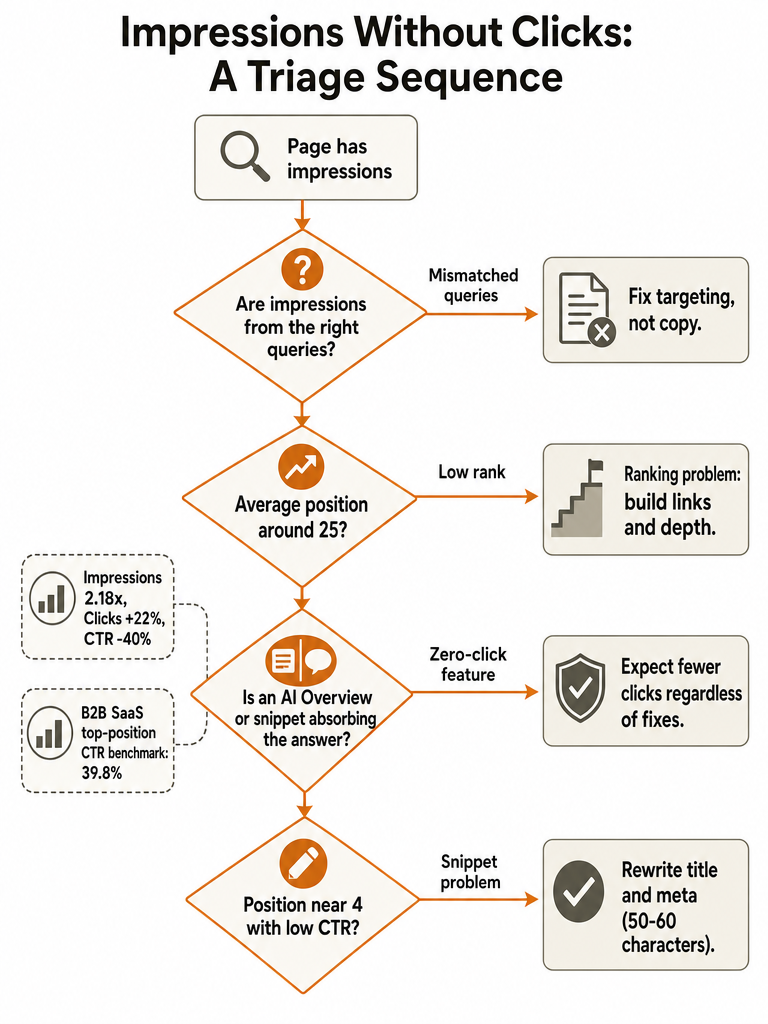
Blog impressions but no clicks calls for checking four things in order: average position first, then whether the impressions are coming from the right queries, then whether an AI Overview or featured snippet is absorbing the click, and only after that the title and meta description. Fixing the title before ruling out the first three wastes a measurement cycle on a page that was never going to earn clicks from a bad ranking or a mismatched query.
An impression only confirms that Google decided to show the page somewhere. It says nothing about whether the result looked worth clicking. Pravin Kumar's diagnostic framework for Search Console frames the whole problem this way: once a page clears discovery, what's left is the gap between what a searcher wanted and what the listing appeared to offer.
Leave the title alone if the page is still buried in the rankings or if most of its impressions come from queries that don't match what the page is actually about. Neither problem gets fixed by better copy. A title and meta description rewrite only earns its keep once position and query fit have already been ruled out, which is why the order matters more than any single fix.
What do impressions, clicks, CTR, and average position actually mean?
Impressions, clicks, click-through rate, and average position are the four metrics Google Search Console reports for every page and query combination, and getting the definitions right is the only way to diagnose a CTR problem instead of guessing at it. Google's own Search Console documentation defines an impression as a case where a link to your site appeared in a user's results on Search, Discover, or News, whether or not the user scrolled far enough to notice it. A click counts only when a visitor actually followed that link to the site.
Click-through rate, or CTR, is clicks divided by impressions, expressed as a percentage, so CTR moves whenever either number moves on its own. Average position is the mean ranking across every impression a page or query received, which means a page can show a moderate average position while most of its actual impressions sit much lower in the results.
Search Console keeps 16 months of page- and query-level history, according to Outrank's analysis of content performance data, long enough to compare a full period against the prior one instead of reacting to a few noisy weeks. That history window matters later: a short dip rarely tells you whether a page has a real problem or a seasonal one.
Is this a ranking problem or a snippet problem?
Average position is the fastest way to tell a ranking problem from a snippet problem, and the two need opposite fixes. Pravin Kumar's Search Console diagnostic guide ties specific positions to specific causes: a page sitting around position 4 with almost no clicks points to a snippet problem, because searchers are already seeing a strong listing and still skipping it. A page sitting around position 25 with no clicks points to a ranking problem, because it's buried below where most searchers look regardless of how the listing reads. Positions in the 8 to 12 range are genuinely ambiguous, and Pravin Kumar's guidance is to still test the title and meta description there rather than assume it's purely a ranking issue.
| Average position | What it signals | Where to start |
|---|---|---|
| Around 4 | Visible near the top but still skipped: a snippet problem | Rewrite title and meta description; check whether an AI Overview or featured snippet sits above the result |
| 8 to 12 | Ambiguous: could be a weak snippet, could be a ranking ceiling | Test the title and meta description first, since the listing is still the cheaper fix to try |
| Around 25 | Buried below where most searchers look: a ranking problem | Treat it as a ranking problem, not a copywriting problem |
Are you ranking for the wrong queries?
A page can accumulate impressions for queries it was never meant to rank for, and those impressions don't convert into clicks because the searcher's intent doesn't match what the page delivers. Getfoundquick's guidance on underperforming posts flags this directly: a blog post can show up for several related searches that weren't part of the original keyword strategy, and those incidental terms are often the reason impressions climb while clicks stay flat.
- Open the Performance report in Search Console and filter to the single page URL, following Pravin Kumar's single-page diagnostic method.
- Switch to the Queries tab and sort by impressions to see which searches are actually driving the page's visibility.
- Separate the target query, the one the page was written for, from incidental queries that showed up on their own.
- Flag any query where intent clearly doesn't match the page, such as a navigational search landing on an informational post.
- Check whether the incidental queries still carry business value; some mismatches are harmless, others explain the entire CTR gap.
If most impressions come from queries outside the original keyword strategy, the fix is query targeting and internal linking, not a title rewrite.
Could AI Overviews or other zero-click features be absorbing the click?
Zero-click SERP features answer the searcher's question inside the results page, so impressions log normally even though no one needed to visit the site. Search Engine Land describes this directly: a featured snippet or an AI-generated answer can satisfy informational intent before a click happens, which shows up in Search Console as high impressions paired with a CTR that looks broken even though nothing is technically wrong with the page.
The scale of this shift is measurable. Outrank's analysis of 415 sites found that median impressions grew 2.18 times from October 2025 to August 2026, while clicks grew only 22% over the same period and CTR fell 40%. That gap is consistent with more answers being generated directly inside search results rather than more pages simply losing rankings. For a fuller breakdown of why a page can rank well and still get skipped, including how AI-generated answers extract and verify content differently from classic ranking signals, see AI Overviews citations: why your blog still gets skipped.
If a page's impressions are concentrated in informational queries and the position looks healthy but the CTR still won't move, a zero-click feature sitting above the result is a more likely explanation than a weak title.
What should you fix first: title, meta description, or the page itself?
The fix order matters because touching the wrong piece first burns a measurement cycle you can't get back. Pravin Kumar's single-page workflow for Search Console starts with the data, not the rewrite, and that sequence holds up once ranking and query fit have already been checked.
- Filter Search Console to the exact page URL and set the date range to at least three months, per Pravin Kumar's recommendation, so the sample is large enough to read.
- Open the Queries tab and inspect the individual ranking queries, their CTR, and their position, not just the page-level average, which can hide a low-position query dragging the number down.
- Check whether the page's title element, visible H1, and og:title agree. Pravin Kumar notes that when they disagree, Google may choose among them when generating the title link, which means the title you think is live may not be the one showing.
- Rewrite the title and meta description to answer the query directly rather than describe the page, and keep the title around 50 to 60 characters, a target Dan Swords recommends to avoid truncation.
- Hold off on rewriting the page body until the title and meta fix has had time to run. If CTR still lags after that, that's the point to reconsider content depth, structure, or internal links rather than the headline.
For pages that are part of a larger archive rather than a single post, GEO content strategy for B2B SaaS sites with old blogs covers how to triage which old URLs are worth this level of rework before you start.
How long should you wait before deciding a fix worked?
Diagnosing a page and confirming whether a fix worked use two different windows, and conflating them is a common mistake. Pravin Kumar's Search Console framework calls for pulling the last three months of data to diagnose a page in the first place, because low-volume pages rarely generate enough impressions or clicks in a single week to separate a real pattern from noise. Once you've made one change, such as a title rewrite, wait about four weeks before comparing results, and compare like for like: the same set of queries, against the four weeks immediately before the change.
Judging the result also depends on what a reasonable CTR looks like for the position and topic, not a fixed number. Search Engine Land puts an example good CTR for a B2B SaaS page ranking in position one at 39.8%, compared with 42.2% for a biotech page in the same position, which shows that even top-position benchmarks vary by industry. Comparing a post's CTR against a generic "good CTR" number from a different vertical gives a misleading verdict either way.
Pull the same URL's Performance report at the four-week mark, compare it against the four weeks before the change, not the full three-month diagnostic window, since that window mixes pre- and post-change data, and look at whether clicks and CTR moved on the queries you actually fixed, not just the page total.
Do more clicks always mean more leads?
Impressions, clicks, leads, attribution, and causation are five different measurements, and conflating them is why a CTR fix can look successful on paper while doing nothing for pipeline. Impressions measure visibility. Clicks measure visits. Leads measure conversions tracked in GA4 or a CRM. Attribution decides which touchpoint gets credit for a conversion when several pages or channels touch the same visitor before they convert. Causation is the separate question of whether your specific fix caused the change you're seeing, rather than something else moving at the same time.
Public methodology for connecting one blog post's click-through rate to downstream leads is limited. None of the sources reviewed here cover a reliable way to isolate a single page's CTR fix from everything else moving through a CRM in the same period, so treat any claim that "this title change produced X leads" with skepticism unless it came from a controlled before-and-after test on a stable traffic source.
Teams running SEO and AEO work at the same time tend to hit this attribution problem twice: once for Search Console clicks, once for citations in AI answer engines. AEO vs SEO: what B2B SaaS teams should change first covers how to sequence the two instead of running them as one undifferentiated project.